How route recording works
- Download JourneyDeck and allow Location when you want route recording.
- Start from Today, the Start a Journey widget, Siri, or your paired Apple Watch. Put your phone away. Your route keeps recording while the phone is locked.
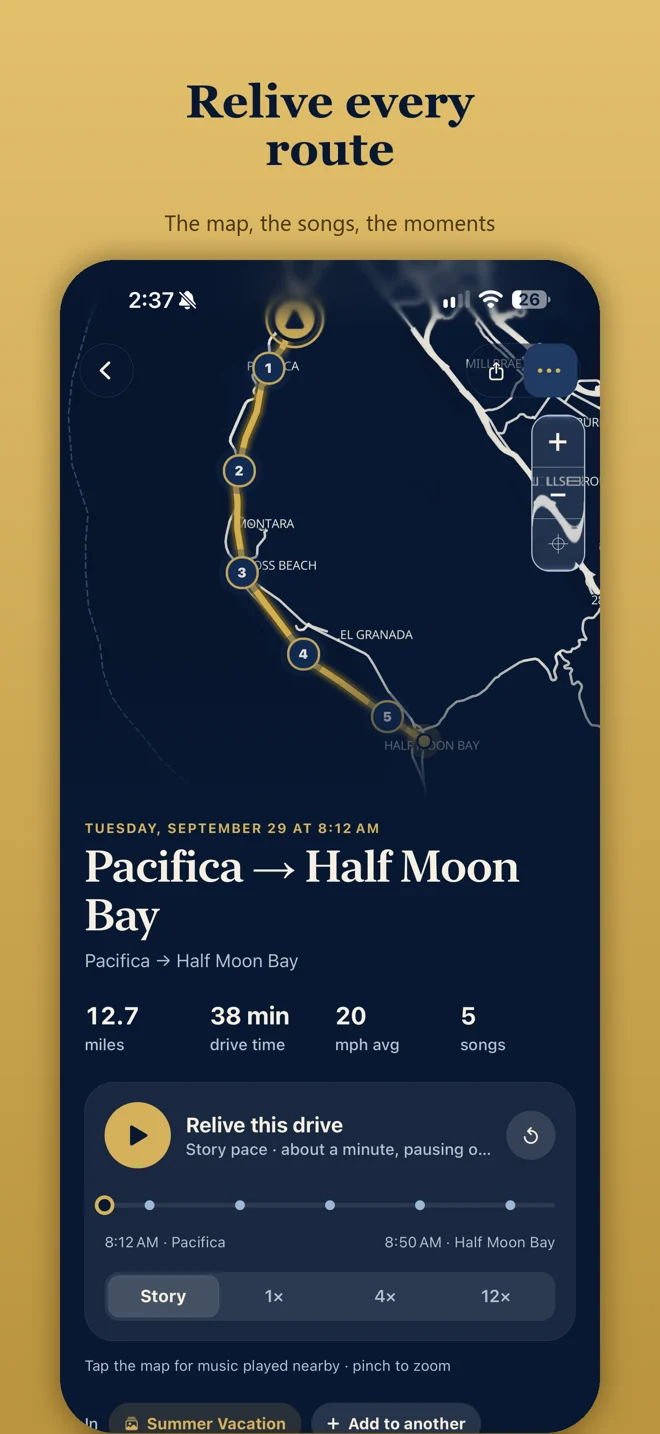
- Once you are parked, end the journey. Explore your route and songs.
- Optionally connect Apple Music for a soundtrack, or add the drive to a Memory with photos and notes.
What this tracker is, and is not
- Manual road trip tracker: you start and finish each journey. Journeys never start automatically.
- Local-first: the route is saved on your iPhone. Core recording works offline, without an account or a subscription.
- Not a background GPS logger: JourneyDeck does not record every drive unless you start the journey, or unless you optionally import Tesla drives through Tessie with JourneyDeck Plus.
- Not navigation: set up recording before driving and do not interact with the app while operating a vehicle.
Read the private driving journal overview for how the archive stays on your device.
After the drive
Revisit the saved route, distance, and drive time. Replay the journey at your own pace. If you connected Apple Music, JourneyDeck can match songs from your authorized listening history to the drive. Some song times and locations may be approximate, and a song may not always be found.
Frequently asked questions
Is there an iPhone app that tracks your route?
Yes. JourneyDeck records the route of journeys you start on iPhone. Tap Start Journey before you drive; your route, distance, and drive time are saved on your device, and recording continues while the phone is locked.
Is JourneyDeck a GPS route tracker?
It records the route of drives you start yourself. It is a manual road trip tracker, not a background GPS tracker that logs every drive automatically.
Does it track every drive automatically?
No. You tap Start Journey when you want to keep a drive. Tesla owners can optionally connect Tessie to import vehicle drive routes. That requires JourneyDeck Plus and Tessie access.
Can I see the route again after the drive?
Yes. When parked, end the journey, then replay the route at your own pace and revisit soundtrack moments saved along the way.
Do I need Apple Music to track a route?
No. Route recording works without Apple Music. An active Apple Music subscription is needed for its automatic soundtrack option; manual song recognition is another optional method.