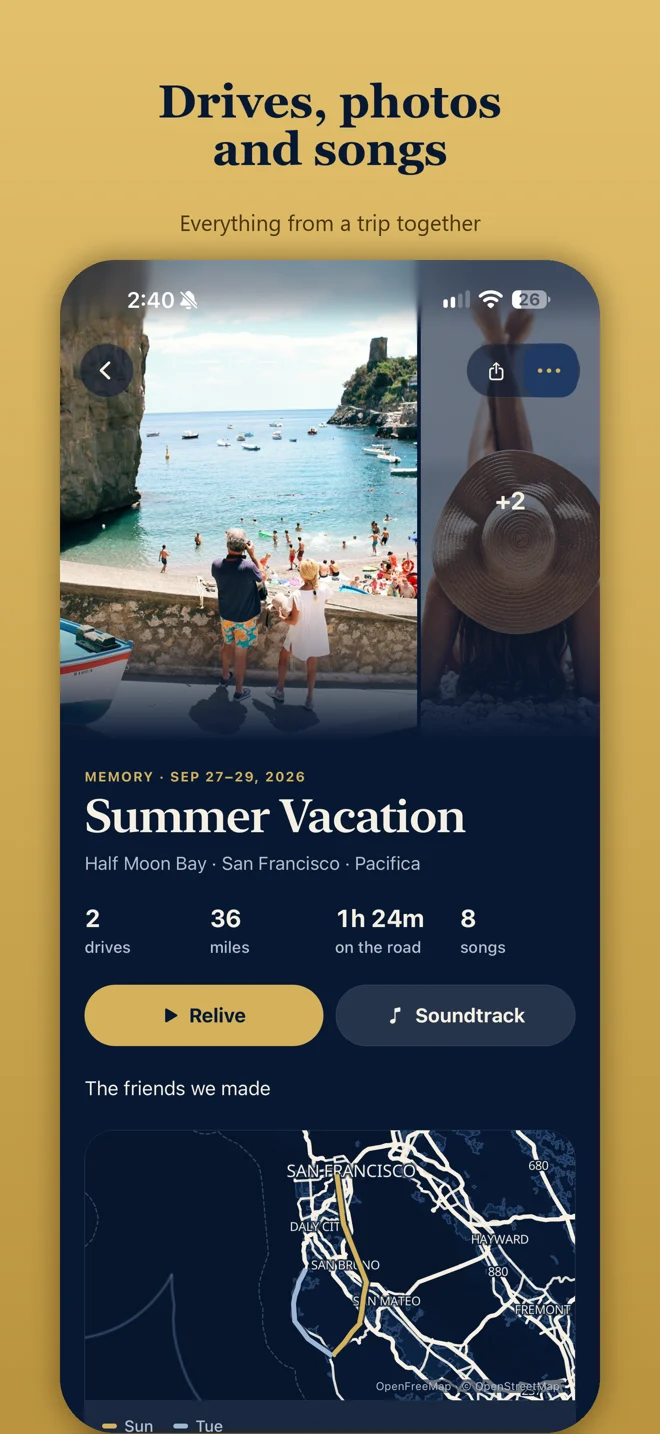
Photos sit with the drive
JourneyDeck is a private driving journal first. You tap Start Journey on iPhone, save the route, then keep pictures of the day with that road. Group related journeys into Memories. Add notes. Replay the map of the roads you have driven.
How photos get into the journal
- Record a journey on iPhone. Your route, distance, and drive time stay on your device.
- When safely parked, add notes and photos during a drive with Journey Markers, or add them later.
- Bring related drives into a Memory and add your own photos and notes.
- Review photo suggestions before adding anything to your archive.
A travel diary with a map, for drives
If you searched for a travel diary app with a map, JourneyDeck shows the route you recorded, then lets photos and notes live with that journey. Optional Apple Music soundtracks match songs from your authorized listening history. Create a journey share card when you choose; sensitive Home, Work, and School places can be protected in the shared view.
Read the private driving journal overview and how Apple Music soundtracks work.
Frequently asked questions
Is there a travel journal app with photos for iPhone?
Yes. Group your drives into Memories, then add your own photos and notes. The route, the pictures and the soundtrack stay together, privately on your iPhone. It is a travel journal built around the drives you record on iPhone, not a general diary for flights or hotel stays.
Does JourneyDeck include a map?
Yes. After you record a journey, you can revisit its route on your device. Memories keep photos with the roads you have driven.
Can I add photos during a drive?
Add notes and photos during a drive with Journey Markers when you are safely parked. You can also add your own photos after the drive when you group journeys into a Memory. Review photo suggestions before adding anything to your archive.
Is this a general travel diary app?
No. JourneyDeck is a private driving journal. Photos, notes, and maps stay with the journeys you start on iPhone.
Do photos leave my device?
Your archive is stored on your device first. Optional private iCloud sync keeps your library available across your iPhone and iPad. Sign-in and iCloud sync are optional. You review photo suggestions before anything is added.